AI-Powered Support Without Per-Resolution Fees: How Helmdesk Does It
AI in customer support is no longer optional. Customers expect fast answers, and AI can draft replies, classify tickets, and surface relevant articles in milliseconds. The problem is not the AI — it is how you pay for it.
Intercom charges $0.99 per AI resolution. Help Scout charges $0.75. That sounds small until you do the math.
The Per-Resolution Problem
Let's say your app handles 1,000 support tickets per month and your AI resolves 40% of them automatically. Here is what that costs:
| Metric | Intercom | Help Scout | Helmdesk |
|---|---|---|---|
| Tickets per month | 1,000 | 1,000 | 1,000 |
| AI resolution rate | 40% | 40% | 40% |
| AI-resolved tickets | 400 | 400 | 400 |
| Cost per AI resolution | $0.99 | $0.75 | $0 |
| Monthly AI cost | $396 | $300 | $0 |
| Annual AI cost | $4,752 | $3,600 | $0 |
At 1,000 tickets per month, you are paying $300–400 per month just for AI. And the better your AI gets — the higher the resolution rate — the more you pay. You are penalized for success.
On Helmdesk, all AI features are included on every paid plan — Starter ($39/month) and Growth ($149/month). No per-resolution fees. No surprises.
How Helmdesk AI Works
Helmdesk uses Google Gemini 3.5 Flash through the Vercel AI SDK. Every AI feature runs against your project's context — your knowledge base articles, your ticket history, your templates.
Here is what each feature does and how it helps.
1. Suggested Replies
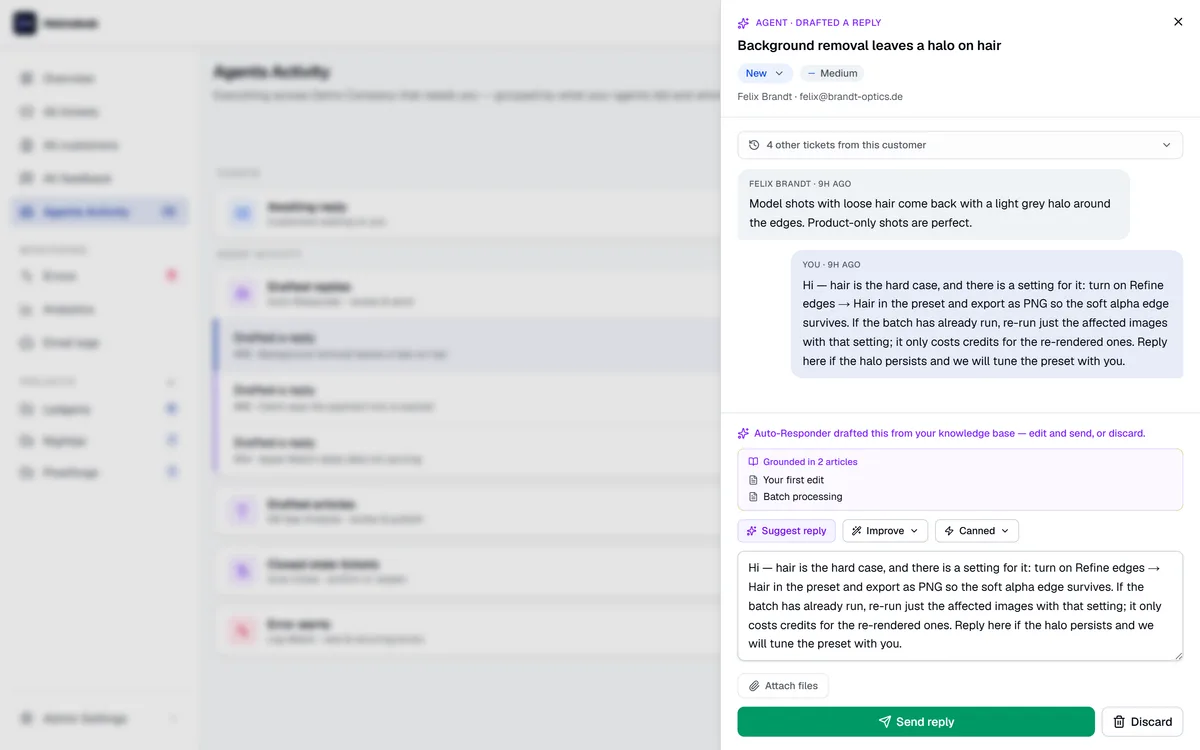
When you open a ticket, the AI reads the customer's message, searches your knowledge base for relevant articles, and drafts a reply. You review, edit if needed, and send.
This is not a generic chatbot response. The AI uses your actual documentation to answer the question. If you have an article about password resets, the suggested reply will reference the specific steps from that article.
2. Auto-Classification
Every incoming ticket is automatically categorized: bug report, feature request, billing question, how-to, or other. No manual triage required.
This classification drives workflows. You can set up auto-responders that trigger only for billing questions, or route bug reports to a specific team member, or prioritize feature requests for your product backlog.
3. Article Drafting
After you resolve a support ticket, the AI can turn that conversation into a knowledge base article. It extracts the question, the solution, and the relevant context — then drafts an article you can review and publish.
Over time, this creates a flywheel: every resolved ticket makes your knowledge base better, which means fewer tickets in the future.
4. Smart Suggestions
Before a customer submits a ticket, Helmdesk's public portal shows relevant knowledge base articles based on what they are typing. If the answer already exists, the customer finds it without ever creating a ticket.
This is deflection done right — not hiding the support form behind a wall of FAQ links, but proactively surfacing relevant content while the customer is already engaged.
5. Template Variable Detection
When you upload or create an email template with Handlebars variables (like {{name}}, {{orderNumber}}, {{resetLink}}), the AI parses the template and generates a variable schema automatically. No manual documentation needed.
6. Queue Summary
A weekly digest that summarizes your open tickets: how many are stale, what categories are trending, and what needs attention. This is especially useful if you manage support across multiple projects — one summary covers everything.
Why Not Charge Per Resolution?
Per-resolution pricing makes AI a variable cost that scales with your success. The more tickets your AI handles, the more you pay. This creates a perverse incentive: you want AI to help, but you also want to keep the bill down.
We believe AI should be infrastructure, not a metered service. You do not pay your database per query or your CDN per cache hit. AI assistance should work the same way — included in the platform, not billed by the interaction.
Helmdesk can do this because we use efficient, cost-effective models (Gemini Flash) and keep our infrastructure lean. The marginal cost of an AI-suggested reply is low enough that bundling it into the subscription makes economic sense for us and much better economics for you.
Getting Started
AI features are available on every paid plan. To enable them:
- Create a project and add at least a few knowledge base articles
- Incoming tickets will be auto-classified automatically
- Open any ticket and click "Suggest reply" to see an AI-drafted response
- Resolve a ticket and click "Draft article" to turn it into a knowledge base entry
The more articles you have, the better the suggestions get. Start with your 5 most common questions and grow from there.
AI support that doesn't charge by the resolution
All six AI features included on every paid plan, from $39/mo. No per-resolution fees.