Add a Helpdesk to Your Next.js App in 5 Minutes

You shipped a Next.js app. Users are signing up. And now someone has a bug report but no way to tell you about it — except maybe a mailto link buried in the footer.
This tutorial shows you how to add a full helpdesk to your Next.js app in under 5 minutes. By the end, your users can submit support tickets, and you will see them in a real dashboard with AI-suggested replies.
What You Will Build
- A support page where users submit tickets (no auth required)
- Server-side ticket creation via the Helmdesk SDK
- A public ticket status page so users can check their issue
- A knowledge base your users can search before submitting
All of this runs on Helmdesk's infrastructure. You just wire it up.
Step 1: Create a Helmdesk Account and Project
Sign up at helmdesk.com/signup — it is free, no credit card required.
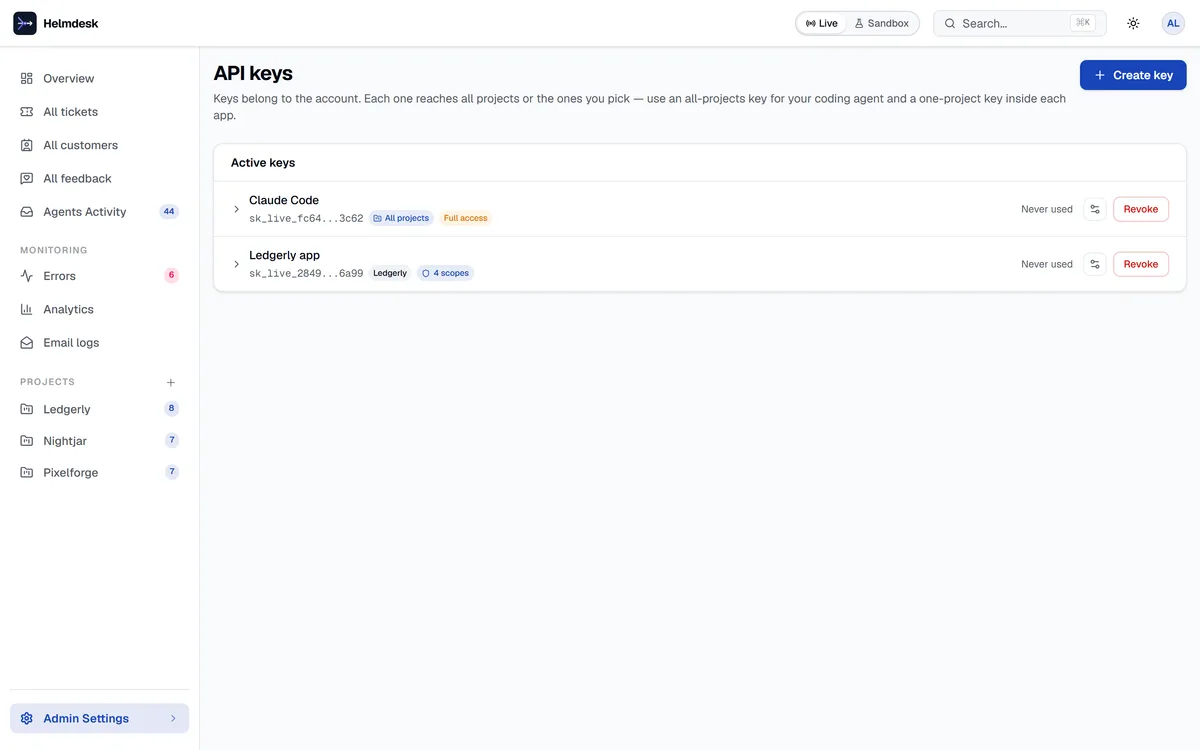
Once you are in the dashboard, create a project. Give it the name of your app. Helmdesk will generate:
- A project slug (used for public portal URLs)
- An API key (used by the SDK)
Copy the API key. You will need it in the next step.
Step 2: Install the SDK
npm install @helmdesk/sdk
The SDK works in Node.js 18+, Deno, Bun, and Cloudflare Workers. For a Next.js app, you will use it in server actions or API routes.
Add the API key to your .env.local:
HELMDESK_API_KEY=hd_your_api_key_here
Step 3: Create a Support Form
Here is a minimal support form component. It calls a server action to create the ticket.
// app/support/page.tsx
'use client'

import { useState } from 'react'
import { submitTicket } from './actions'

export default function SupportPage() {
  const [submitted, setSubmitted] = useState(false)

  async function handleSubmit(formData: FormData) {
    await submitTicket(formData)
    setSubmitted(true)
  }

  if (submitted) {
    return (
      <div className="mx-auto max-w-lg py-24 text-center">
        <h1 className="text-2xl font-bold">Ticket submitted</h1>
        <p className="mt-2 text-gray-600">
          We will get back to you as soon as possible.
        </p>
      </div>
    )
  }

  return (
    <form action={handleSubmit} className="mx-auto max-w-lg space-y-4 py-24">
      <h1 className="text-2xl font-bold">Contact Support</h1>
      <input name="email" type="email" placeholder="Your email" required
        className="w-full rounded border px-3 py-2" />
      <input name="subject" type="text" placeholder="Subject" required
        className="w-full rounded border px-3 py-2" />
      <textarea name="message" placeholder="Describe your issue" required rows={5}
        className="w-full rounded border px-3 py-2" />
      <button type="submit"
        className="rounded bg-black px-4 py-2 text-white hover:bg-gray-800">
        Submit
      </button>
    </form>
  )
}
Step 4: Create the Server Action
// app/support/actions.ts
'use server'

import { Helmdesk } from '@helmdesk/sdk'

const helmdesk = new Helmdesk({
  apiKey: process.env.HELMDESK_API_KEY!,
})

export async function submitTicket(formData: FormData) {
  await helmdesk.tickets.create({
    subject: formData.get('subject') as string,
    message: formData.get('message') as string,
    customer: {
      email: formData.get('email') as string,
    },
  })
}
That is it. Four lines of SDK code. When a user submits the form, a ticket appears in your Helmdesk inbox instantly.
Step 5: Use the Built-in Public Portal (Optional)
If you prefer not to build your own form, Helmdesk provides a public support portal out of the box. Every project has a public URL:
https://helmdesk.com/p/your-project-slug/support
Link to it from your app's header, footer, or help menu. Users can submit tickets, check status, and browse your knowledge base — all without logging in.
What Happens Next
Once the ticket is in Helmdesk:
- You get a notification (email or in-app)
- The AI auto-classifies the ticket (bug, feature request, billing, how-to)
- When you open the ticket, the AI suggests a reply based on your knowledge base articles
- You edit, approve, and send — the customer gets an email notification
- When the ticket is resolved, the AI can draft a knowledge base article from the thread
All of this is included on every paid plan, from Starter up. No per-resolution fees, no per-seat pricing.
Going Further
- Webhooks — get notified in your own system when tickets change status
- Workflows — auto-respond to new tickets, auto-close stale ones
- Email templates — send transactional emails through the same SDK
// Send a transactional email
await helmdesk.emails.send({
  to: 'user@example.com',
  template: 'welcome',
  variables: { name: 'Alex', appName: 'YourApp' },
})
One SDK. Tickets, emails, and knowledge base. No extra tools.
Add support in 5 minutes
Free tier includes 1 project and 100 conversations a month. No credit card required.