Welcome, Receipt, Password Reset: Your App's Email in an Hour
Every app needs the same five emails on day one: welcome, verify your address, reset your password, your password was changed, here is your receipt. Every app also ships them badly at first, because they are written at midnight in an HTML string inside a route handler, never previewed, and sent for the first time to a real customer.
This is the hour that fixes that. Templates installed from a design, branded once, sent from one call, rehearsed where nothing can reach an inbox, and logged so "I never got it" has an answer.
You need a Helmdesk project, a key with emails:send (and emails:read if you want to query the log from code), and the SDK.
Minutes 0–10: sending credentials
Helmdesk sends on your sender, through your own provider, and never marks up the sends. So the first step is telling it how.
Admin Settings → Email providers → Add. Paste the SMTP or API credentials for whichever provider you use. Providers are account-level, so five apps share one set of credentials and rotate them in one place. Then in the project, Email → Email config, pick that provider and set the from-name and from-address for this app.
If SPF, DKIM and DMARC are new words, this is the ten-minute explanation. Get them right before the first send; the Email Health agent will check them weekly afterwards.
Minutes 10–20: install the design
Email → Templates → Create template. A full-screen gallery opens with the built-in designs. Helm Basic is a layout plus eight templates: welcome, verify email, password reset, password changed, order confirmation, payment failed, subscription expiring, subscription expired.
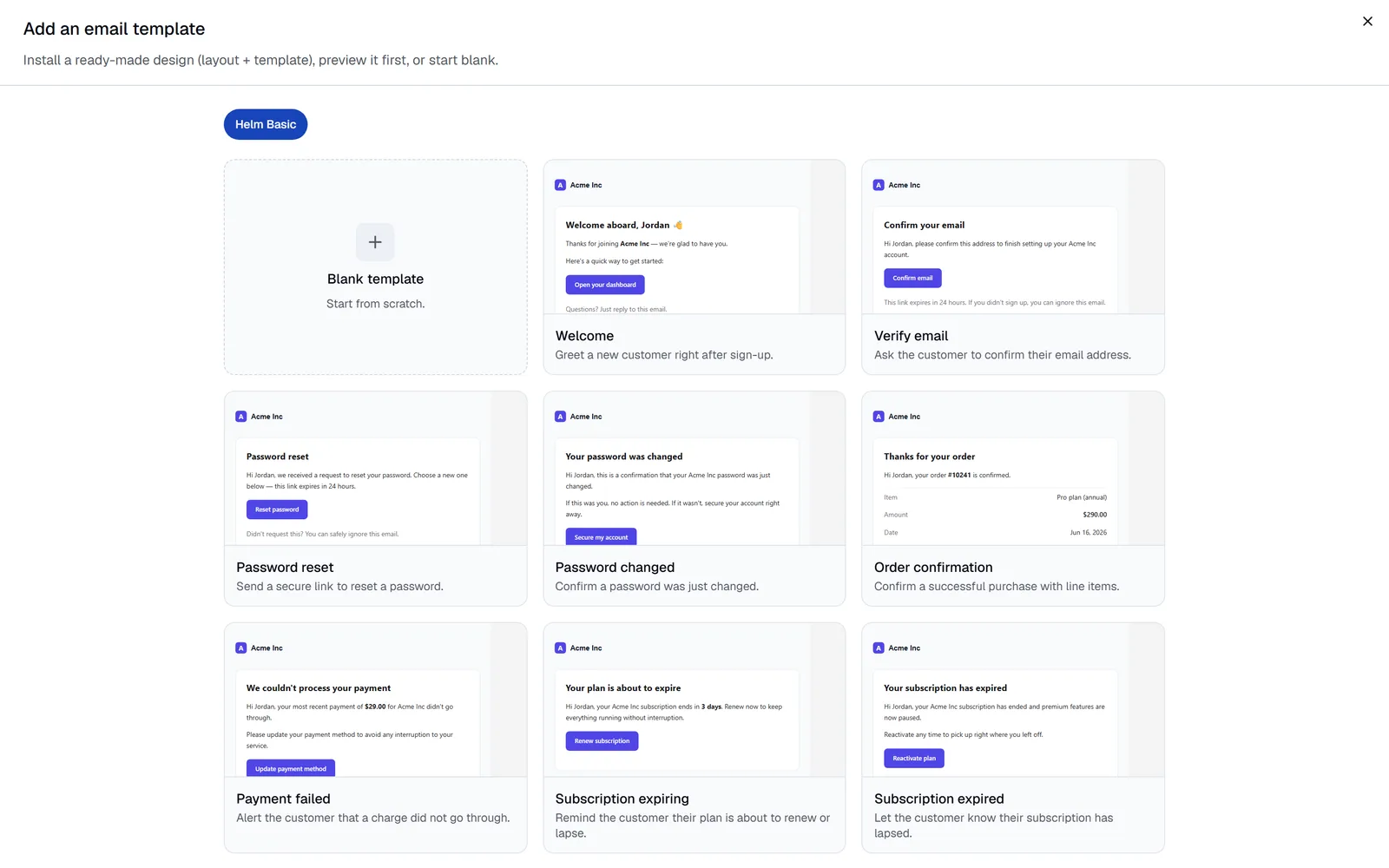
Click a template to see it rendered full size with sample data. Switch Preview with to your project to see it in your branding. Click Install on each one you need. Each installs as a versioned project template with a namespaced key (helmbasic-welcome, helmbasic-password-reset, and so on) and the layout comes with it, once, however many templates you install.
Open one in the editor if you want to change the copy. The subject and body are Handlebars, so {{name}} and {{brandName}} are variables; the schema of what each template expects is visible in the editor and from the API.
Minutes 20–30: brand it once
Project Settings → General: logo, colour, name. The Helm Basic layout reads all three, so every template you installed is now in your brand, and so is every notification email the project sends on your behalf. Change the colour next year and every email changes with it.
Minutes 30–40: the send
One call per email, from wherever the event happens in your app:
import { Helmdesk } from '@helmdesk/sdk'
const helmdesk = new Helmdesk({ apiKey: process.env.HELMDESK_API_KEY! })

// On signup
await helmdesk.emails.send({
  templateKey: 'helmbasic-welcome',
  to: { email: user.email, name: user.name },
  variables: { name: user.firstName, dashboard_url: `${APP_URL}/dashboard` },
  idempotencyKey: `welcome-${user.id}`,
})

// On password reset request
await helmdesk.emails.send({
  templateKey: 'helmbasic-password-reset',
  to: { email: user.email, name: user.name },
  variables: { name: user.firstName, reset_url: `${APP_URL}/reset?token=${token}` },
})
The idempotencyKey is worth the extra line on anything a retry could double: a job that runs twice sends once.
If the template expects a variable you did not pass, the send fails with a clear error naming it rather than mailing a customer {{name}}. emails.getTemplateSchema('helmbasic-welcome') returns the list if you would rather check first.
Minutes 40–50: rehearse it
Do not send the first one to a person. Point the client at sandbox:
const sandbox = helmdesk.withEnvironment('sandbox')
await sandbox.emails.send({ templateKey: 'helmbasic-welcome', to: { email: 'me@example.com' }, variables: { … } })
Or use an sk_sandbox_ key, which can only reach sandbox whatever it is asked. Either way the email renders fully, lands in the project's Email Logs with status sandboxed, and is delivered nowhere. Open it in the reading pane and read it as HTML and as plain text.
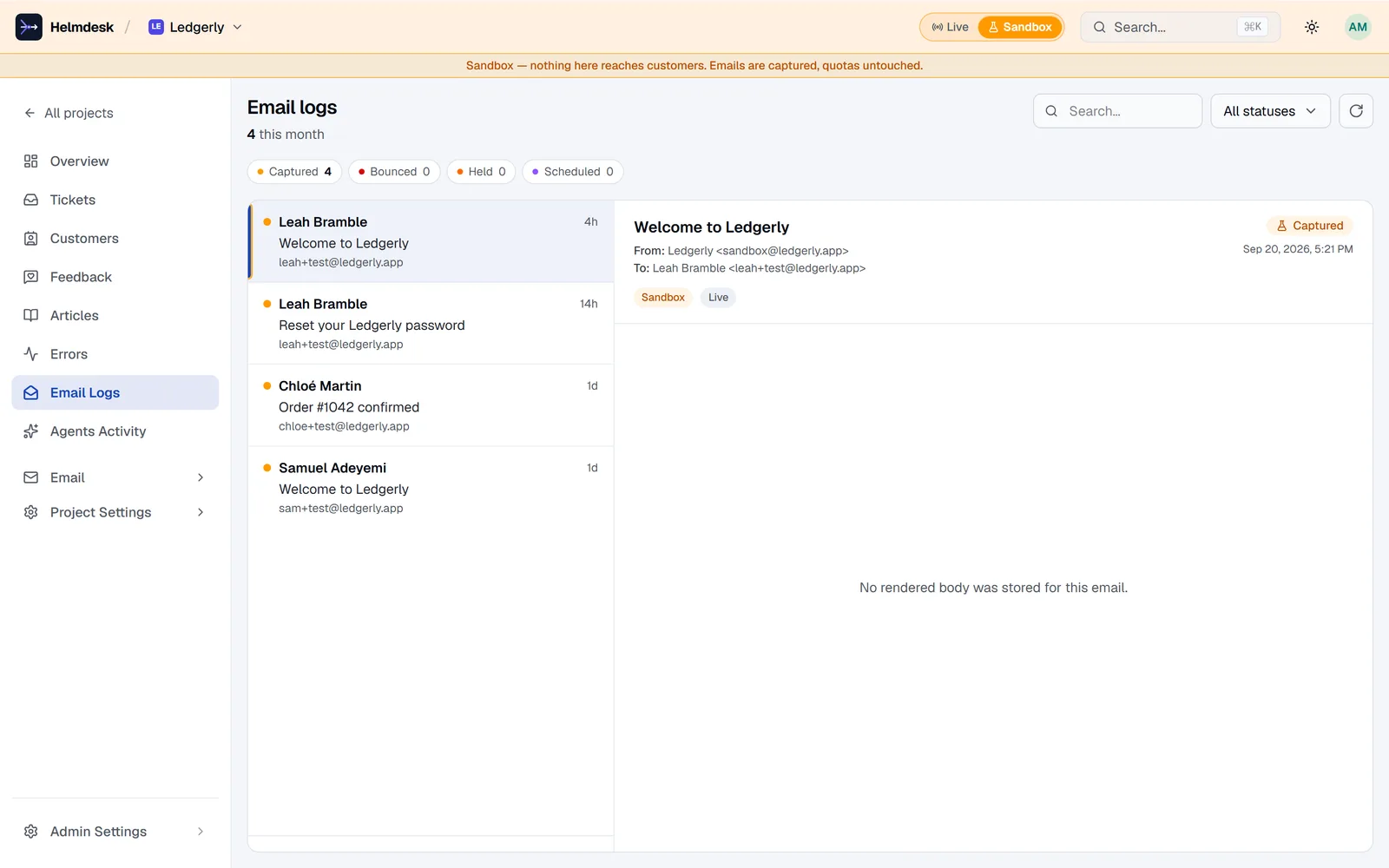
Fix the copy, resend, repeat until it is right. Then drop the environment flag. Nothing else changes. The case for rehearsing support like a payment flow is the longer argument; the mechanics are that one line.
Minutes 50–60: the two extras
A one-off. Sometimes there is no template because there will never be a second one: a personal note about a bug they reported, a one-time notice. Subject and a Markdown body, same gateway, same log:
await helmdesk.emails.sendCustom({
  to: { email: 'dana@example.com', name: 'Dana' },
  subject: 'About the export you reported',
  body: 'Hi Dana,\n\nThe CSV export is fixed and live. Thanks for the clear report.\n\n— Alex',
})
It is one recipient, one occasion, and {{variables}} are deliberately not substituted; for anything you would send twice, make a template.
A scheduled send. Any send takes a sendAt up to thirty days out. The email renders now and waits as scheduled; cancel it from the Email Logs reading pane or emails.cancel(id) until it fires. Suppression and pause are re-checked at fire time, so a customer who unsubscribes in between is not mailed.
Afterwards: when someone says "I never got it"
This is the part the midnight HTML string never had. Every send is a row in Email Logs with its status: sent, delivered, bounced, blocked, held, scheduled, sandboxed. If it says blocked, the suppression list says why (a hard bounce in March, usually) and one click clears it and resends. From your editor, "why didn't Dana get her receipt?" is one lookup; the suppression audit is the habit that stops it recurring.
And once a week, the Email Health agent checks your DNS records and bounce rates across every project and tells you in one line if something drifted.
Five emails, one hour. Not one of them was written in a route handler, and not one of them was sent to a real person before you had read it.
Transactional email that is already built
Install a design, brand it once, send from one call on your own sender, and read the delivery log when it matters.