Know Who Is Paying Before You Reply

Two tickets arrive at the same time with the same subject: "Export is broken." One is from someone on a free trial who signed up yesterday. The other is from a customer paying you $149 a month whose renewal is next week.
You should answer both. You should answer the second one first, and you should answer it knowing it is the second one. Most helpdesks cannot tell you, because the helpdesk and the billing system have never met.
This tutorial wires them together. Twenty minutes, one webhook handler, and every ticket arrives with the customer's plan on it.
What the directory already does for free
Every project in Helmdesk has a customer directory that builds itself. The first time an email address opens a ticket, submits feedback, or writes in through the widget, a customer record appears with the name and email, and every later interaction files under it. You never create these by hand.
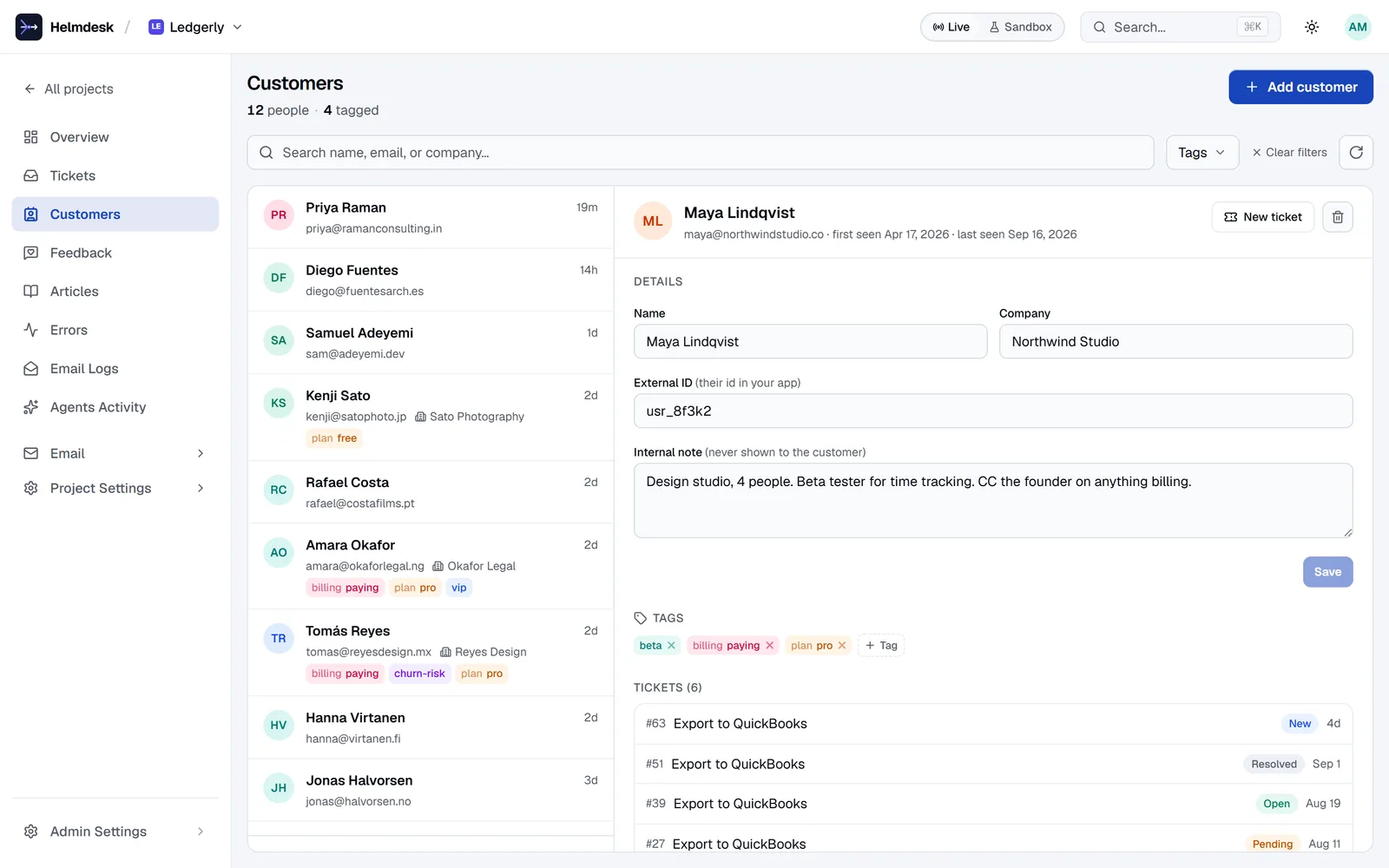
What it cannot know on its own is anything from your app: which plan they are on, what their user id is, whether they are a trial or a paying account. That is what the rest of this post adds.
Step 1: give the customer your app's id
The join key between Helmdesk and your app is externalId, which is your user id. Set it once, when the user signs up, and you can look them up from your app without knowing their email:
import { Helmdesk } from '@helmdesk/sdk'
const helmdesk = new Helmdesk({ apiKey: process.env.HELMDESK_API_KEY! })

// On signup (or lazily, the first time you need it)
async function ensureCustomer(user: { id: string; email: string; name: string }) {
  const existing = await helmdesk.customers.getByEmail(user.email).catch(() => null)
  if (existing) return existing.id
  const created = await helmdesk.customers.create({
    email: user.email,
    name: user.name,
    externalId: user.id,
  })
  return created.id
}
getByEmail is the honest lookup: email is the join key to tickets and feedback, so the customer may already exist from a ticket they sent before they ever signed up. Creating them again would 409.
Step 2: tag the plan from the Stripe webhook
Tags are free text with one convention that matters here: namespace:value. plan:starter, plan:pro, billing:paying. It is a convention, not a schema, but it unlocks the one operation that makes billing sync trivial: replace by namespace.
// In your Stripe webhook handler. Safe to call on EVERY subscription event.
case 'customer.subscription.created':
case 'customer.subscription.updated':
case 'customer.subscription.deleted': {
  const sub = event.data.object
  const user = await db.user.findByStripeCustomer(sub.customer)
  const customerId = await ensureCustomer(user)

  const plan = sub.status === 'active' ? sub.items.data[0].price.lookup_key : 'free'
  await helmdesk.customers.setTags(customerId, [plan], { namespace: 'plan' })
  await helmdesk.customers.setTags(customerId, [sub.status === 'active' ? 'paying' : 'free'], {
    namespace: 'billing',
  })
  break
}
setTags with a namespace swaps plan:starter for plan:pro atomically and leaves every other tag (vip, beta-tester) alone. Your webhook never has to look up what plan they were on in order to un-set it. It converges from wherever the customer started, on every event, which is exactly the property you want from a handler Stripe will retry.
Plain add and remove cannot do that. To remove plan:starter you would have to know it was there. Prefer the namespace form for anything that has exactly one value at a time.
Run it in sandbox first: new Helmdesk({ apiKey, environment: 'sandbox' }) and a Stripe test-mode event. The tags land on sandbox customers, nothing touches live.
Step 3: see it on the ticket
Nothing to configure. Open the project's ticket list and the customer's tags show next to their name; open the ticket and the reading pane carries the whole record: plan, external id, the staff note, and their previous tickets and feedback.
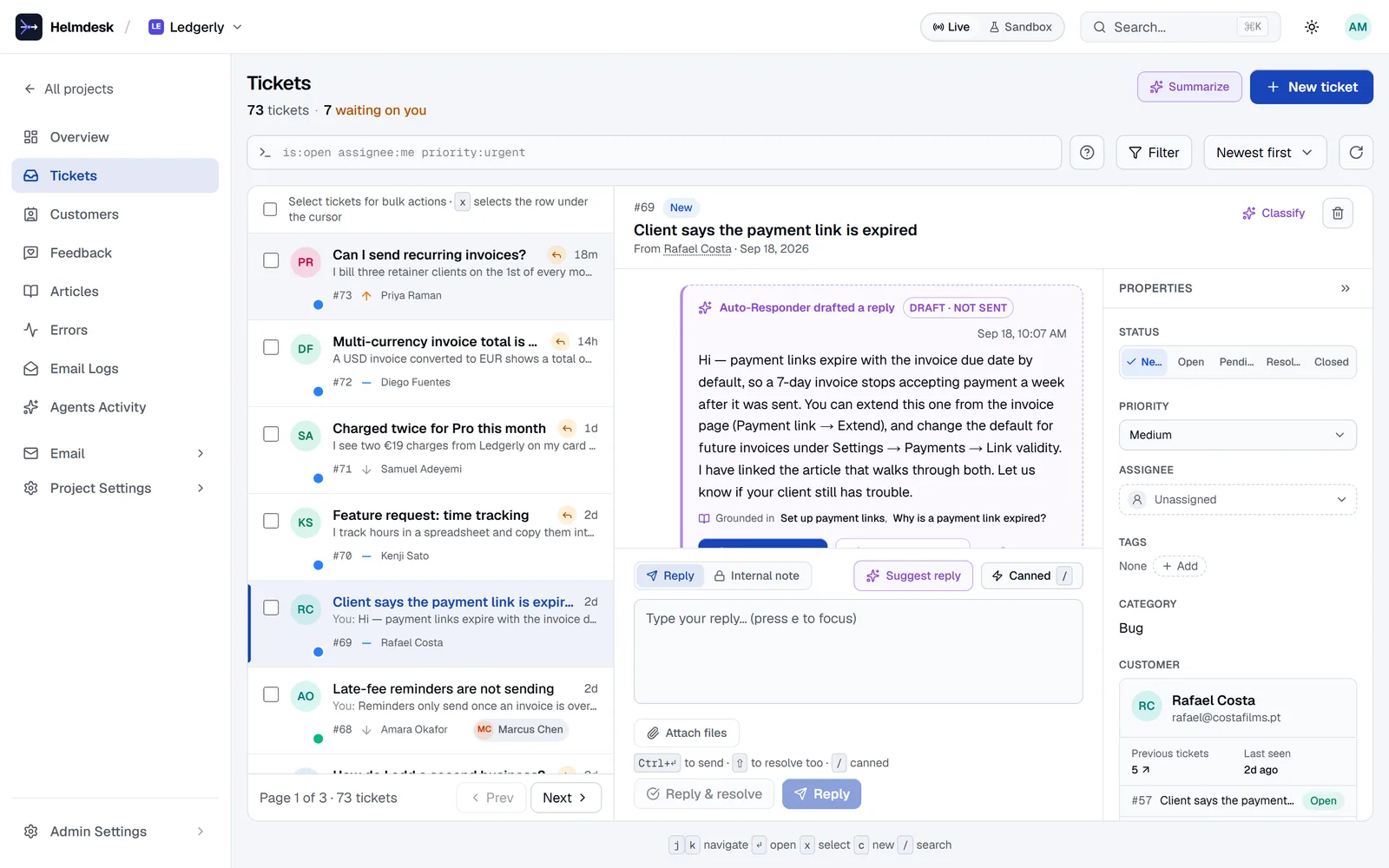
Now the two "Export is broken" tickets look different. One says plan:pro and has three earlier tickets; the other says plan:free and signed up yesterday.
Step 4: sort the queue by it
The customer list filters by tags, and the filters AND together: plan:pro + vip finds people who are both. Save the view you look at first thing (Saved views on the ticket list) and the queue opens sorted your way every morning.
And from your editor, with the MCP server connected:
Which open tickets are from customers tagged plan:pro or plan:business?
List them oldest first with the customer's last ticket before this one.
list_customers with the tag filter, list_tickets for each, all reads. Or the version that finds the churn risk before it churns:
Any customer tagged billing:paying who has opened two or more tickets in
the last 30 days, or rated feedback 2 or below? Show me who, and what.
That second prompt is the one I would run weekly. The customers it finds are the ones worth a proactive note, and get_customer gives the agent everything it needs to draft one, with the send waiting for you.
Step 5: the staff note
One more field is worth using: internalNote. It is staff-only, never shown to the customer, and it is the place for the thing you would otherwise keep in your head: "Churn risk, pricing complaint in March", "Design partner, gets early builds", "Never resend invoices, accounting emails them". Set it from the dashboard or the API. It shows on every ticket they open from then on.
What you have
Every ticket now arrives knowing who sent it, what they pay, what id they are in your app, and what they asked before. The plan tag stays right on its own, because a Stripe webhook that converges is a webhook you never have to think about again. And the question "who is this person?" is answered before you read the first line.
The full API is at /docs/customers. Why this is not a CRM, and should not be, is the shorter argument for keeping it this small.
Every ticket knows who sent it
A customer directory that builds itself, tags that sync from your billing webhook, and the whole history on every ticket.