Send Transactional Emails from One Dashboard: Templates, Layouts, and Providers

If you are running multiple apps, you are probably managing email templates in multiple places. A welcome email in Resend for App A. A password reset template in SendGrid for App B. An invoice notification hardcoded in App C.
Helmdesk's email gateway centralizes all of this. Write templates once, share across projects, send through your own provider, and track delivery — from the same dashboard where you manage support tickets.
The Problem with Scattered Email
Most developers end up with a fragmented email setup:
- App A uses Resend with templates stored in the codebase
- App B uses SendGrid with templates in their dashboard
- App C uses raw Nodemailer with inline HTML
When you want to update your email design — new logo, updated footer, different button styles — you do it three times in three different places. When a provider has downtime, you scramble to switch each app individually.
This is the same multi-app tax that hits support tools, and the fix is the same: one centralized system.
How the Email Gateway Works
Helmdesk's email gateway has four layers:
1. Templates
Templates use Handlebars syntax for dynamic content. Write your template in the built-in editor with live preview:
<h1>Welcome to {{appName}}, {{name}}!</h1>

<p>Your account is ready. Here's what to do next:</p>

<a href="{{dashboardUrl}}" style="...">Go to your dashboard</a>

{{#if trialDays}}
  <p>Your free trial lasts {{trialDays}} days.</p>
{{/if}}
Each template belongs to a project, but you can share templates across projects using the shared template library (Growth plan and up).
2. Layouts and Partials
Layouts wrap your templates with consistent structure — header, footer, navigation. Partials are reusable snippets you can include in any template.
Layout: "default"
├── Header partial (logo, nav)
├── Template content (dynamic)
└── Footer partial (unsubscribe, address)
Update the footer partial once, and every email across every project picks up the change. No more copy-pasting footer HTML between templates.
3. Providers
Connect your own email provider. Helmdesk supports:
- Brevo (formerly Sendinblue) — via API key
- Resend — via API key
- Custom SMTP — any SMTP server (Postmark, Mailgun, Amazon SES, your own)
Each project can use a different provider, or share one across projects. Credentials are encrypted at rest.
Switching providers takes 30 seconds: add the new provider, set it as active, done. No code changes, no redeployment. If your provider goes down, switch to a backup without touching your application.
4. Environment-Aware Sending
The gateway supports four sending modes:
- Live — emails are sent to real recipients
- Sandbox — emails are logged but not sent (for development)
- Allowlist — emails only go to addresses you approve (for staging)
- Paused — all sending is stopped (kill switch)
This means your staging environment can use the same templates and provider without accidentally emailing real users.
Sending Emails via the SDK
The SDK makes sending a single function call:
import { Helmdesk } from '@helmdesk/sdk'

const helmdesk = new Helmdesk({
  apiKey: process.env.HELMDESK_API_KEY!,
})

await helmdesk.emails.send({
  to: 'user@example.com',
  template: 'welcome',
  variables: {
    name: 'Alex',
    appName: 'MyApp',
    dashboardUrl: 'https://myapp.com/dashboard',
    trialDays: 14,
  },
})
Or via the REST API:
curl -X POST https://helmdesk.com/api/v1/emails/send \
  -H "Authorization: Bearer hd_your_api_key" \
  -H "Content-Type: application/json" \
  -d '{
    "to": "user@example.com",
    "template": "welcome",
    "variables": { "name": "Alex", "appName": "MyApp" }
  }'
The API also supports previewing a template with variables before sending, and importing templates from your codebase.
Tracking and Suppressions
Every email is tracked through its lifecycle: queued, sent, delivered, bounced, complained, unsubscribed. You can see the full history in the dashboard.
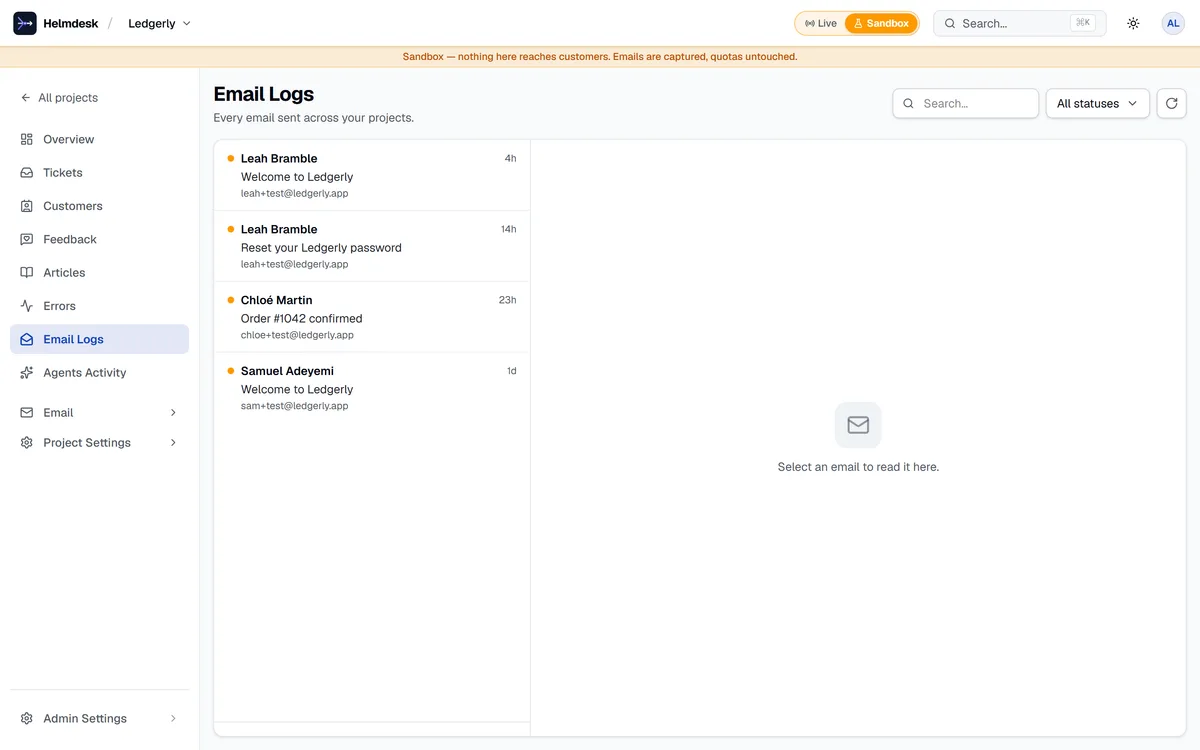
The suppression system automatically handles:
- Bounces — hard bounced addresses are suppressed automatically
- Complaints — spam complaints suppress the address
- Unsubscribes — honored automatically
- Manual — you can manually suppress any address
Suppressions are per-project. An unsubscribe from App A does not affect emails from App B.
Template Variable Detection
When you create or import a template, the AI scans the Handlebars syntax and generates a variable schema automatically. It detects:
- Variable names and types (
{{name}}→ string,{{trialDays}}→ number) - Conditional blocks (
{{#if trialDays}}→ optional field) - Iterators (
{{#each items}}→ array)
This schema powers the preview form in the dashboard and validates API requests.
Why Not Just Use Resend?
Resend is excellent for email delivery. But it is only email. You still need a separate helpdesk, a separate knowledge base, and separate template management per project.
Helmdesk gives you email alongside helpdesk and knowledge base — in the same dashboard, with the same API key, managed per project. For developers running multiple apps, this consolidation is the point.
If you are happy with your email setup and just need a helpdesk, that is fine too. The email gateway is optional — you can use Helmdesk purely for support and knowledge base. But if you want to simplify your stack, the email gateway is already there.
One SDK for tickets, emails, and knowledge base
Stop managing email across 5 tools. Helmdesk centralizes templates, providers, and delivery tracking.